

Reels are Instagram’s favorite format, designed to boost engagement and reach. And here’s the secret: you don’t need video clips to create one. By combining your photos with music, you can build an eye-catching reel in just minutes. This guide walks you step by step through the process, with pro tips and best practices for making photo reels that stand out in 2025.
Want to keep inspiration from other creators? Save any reel instantly with our Instagram Reels Downloader
Quick Steps to Make a Photo Reel
Creating a reel with photos and music is easier than it looks. To give you a quick overview, here’s the simple flow before we dive into details:
- Open Instagram → Tap + → Select Reel
- Pick one or multiple photos
- Adjust how long each photo appears
- Add music from Instagram’s library or your own audio
- Preview, add text and effects
- Choose a cover image and publish
Creating a Reel from Photos Inside Instagram
Instagram’s own app gives you everything you need to turn photos into reels. With just a few taps, you can arrange your images, adjust their timing, and add simple effects—all without leaving the platform.
- Choose your photos: Select one or several images from your gallery.
- Set duration: Decide how long each photo stays on screen.
- Add text or stickers: Use overlays to highlight key moments or tell a story.
- Apply transitions: Make the movement between photos smoother.
- Use the align tool: Keep elements consistent when adding multiple frames.
This method is perfect if you want to create a reel quickly without relying on third-party tools.

How to Add Music to Your Instagram Photo Reel
Music transforms a simple sequence of photos into a reel that feels alive and memorable. Instagram makes it easy to add sound directly within the app, so you don’t need any extra tools. Here’s how you can do it:
- Browse the Music Library: Search for trending tracks or pick a song that fits your story.
- Use Original Audio: Record your own sound or voiceover for a personal touch.
- Trim and sync: Choose the exact part of the song that matches the rhythm of your photos.
Want to save Stories together with their soundtrack? Try our Instagram Story Downloader
Using Templates and Creative Tools for Instagram Reels
If you want your photo reels to look more polished, templates and third-party tools can make the process faster and easier. Instead of adjusting everything manually, you can rely on pre-set timing, transitions, and even music.
Instagram Templates: These are built into the app and already synced with audio. All you need to do is drop in your photos, and the reel is ready in seconds.
Canva: Great for designing reels with custom fonts, colors, and branded elements.
Kapwing: Ideal for adding animations, transitions, and advanced editing features.
These tools save you time and give your reels a professional finish, especially if you’re creating content for business or want your posts to stand out visually.
Best Practices to Make Your Reel Stand Out
Publishing a reel is easy, but making people watch it to the end, and even share it, requires strategy. By following a few proven best practices, you can boost engagement and increase your chances of going viral.
- Hook fast: Capture attention in the first 3 seconds with a strong visual or text overlay.
- Use trending audio: Instagram’s algorithm often pushes reels that feature popular sounds.
- Add captions: Many users watch with sound off, so captions keep your message clear.
- Post consistently: Regular posting signals to Instagram that your content is valuable.
- Experiment: Test different photo styles, transitions, and music genres to see what resonates with your audience.
These simple habits make the difference between an average reel and one that builds real visibility.
Pro Tips to Make Your Instagram Photo Reels Stand Out
Creating a reel is just the start,the real challenge is making it engaging enough to stop the scroll. By applying a few smart strategies, you can transform simple photo reels into content that grabs attention and earns more views.
Hook fast: The first three seconds should instantly spark curiosity.
Use trending audio: Pair your photos with popular tracks for better reach.
Add captions: Make your reel accessible to viewers watching without sound.
Stay consistent: Posting regularly tells the algorithm your content is valuable.
Experiment and analyze: Try different photo styles, music, and formats, then track what performs best.
These tips help your reels rise above the noise and connect with your audience on a deeper level.
Instagram Reel Requirements (2025)
Even the most creative reel won’t perform well if it doesn’t meet Instagram’s technical requirements. By following these standards, you ensure your photo reels look sharp, load quickly, and are favored by the algorithm.
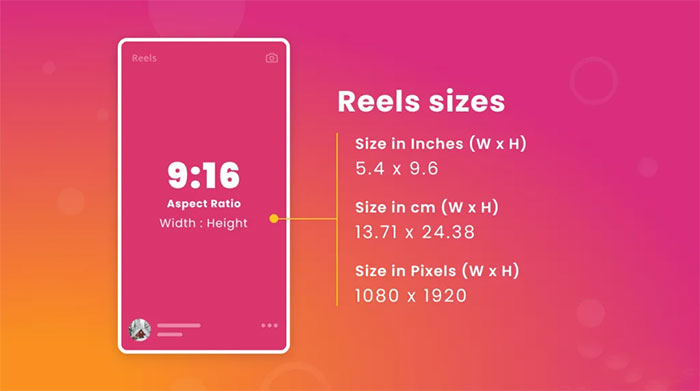
- Aspect ratio: 9:16 for full-screen vertical display.
- Resolution: At least 1080 x 1920 pixels for clear visuals.
- Length: Up to 90 seconds for most users; some accounts can post reels up to 3 minutes.
- Frame rate: 30 fps recommended for smooth playback.
Sticking to these requirements helps your reels appear professional and optimized across all devices.
FAQs About Photo Reels with Music
How many photos can I use in a reel?
As many as you want, but 6–10 works best for attention span.
Can I change the music after posting?
No. Music must be set before you publish.
Can I upload reels from a computer?
Yes, via Meta Business Suite or third-party scheduling tools.
Can I save captions and hashtags from Instagram reels?
Use our Instagram Caption Saver to store and reuse captions from posts and reels.








Leave a Reply