Author: dlinstaadmin

  • What Are Followers on Instagram? (Importance & Growth Tips in 2025)

    What Are Followers on Instagram? (Importance & Growth Tips in 2025)

    What are followers on Instagram? The truth might surprise you. Some people are always watching, and sometimes it feels like they know more about your online life than you do. Your digital entourage of intrigued strangers, loyal fans, and virtual neighbours somehow seems to recognize when you’re awake, what you’re looking at, and even which memes make you laugh.
    Some silently track every post and Story, while others linger in the shadows of your feed, ready to like, comment, or judge. Curious who your followers are? Learn it today!

    What Is an Instagram Follower?

    Let’s have Instagram followers explained. A follower is someone who chooses to subscribe to your account, whether on Instagram, TikTok, Facebook, or X (Twitter). By tapping the follow button, they signal that they want to see your posts, Stories, Reels, and updates in their feed. Essentially, the following is a way for users to opt in to your content, showing interest in what you share.
    Followers on Instagram specifically are more than just numbers; they make up your audience, the people who are genuinely engaged with your content. Some might be drawn to your professional insights, others to lifestyle updates, creative projects, or entertaining posts. Each follower represents a connection, someone who values your content, interacts with it, and has the potential to amplify your voice across the platform.
    They help define your influence, increase Instagram followers and your reach, and contribute to your growth. They’re also the people who can provide feedback, support your initiatives, and even introduce your content to new communities through likes, comments, shares, and saves.

    Follower vs. Following: What Are the Differences?

    You might still want more clarity on the meaning of Instagram followers, and their difference from followings. Followers are your personal fan club. Following, on the other hand, is your curated list of inspirations; the people whose lives, updates, or memes you can’t resist keeping tabs on.
    One is about who’s watching your world; the other is about whose world you’re peeking into. Following shapes your feed, sparks ideas, and keeps you connected to trends, communities, and people who inspire you.

    Why Do Followers Matter on Instagram?

    Followers on Instagram form the foundation of online growth; that’s why Instagram followers matter. The size and quality of your follower base directly influence how far your content can reach and how much impact you have.
    For businesses, brands, creators, and influencers, having followers means expanding visibility to new Instagram audiences, nurturing a loyal and engaged community, and boosting the chances that posts will gain traction through likes, shares, and saves.
    A strong follower base also boosts the likelihood of being discovered by Instagram’s algorithm, which rewards engaging and widely shared content.
    Also, to manage Instagram followers and content professionally, we recommend learning how to archive all posts on Instagram. This method allows you to keep your posts organized without deleting content.

    How to Get More Followers on Instagram?

    Growing your Instagram followers requires a thoughtful approach and consistent effort. It’s not just about posting frequently.
    Sustainable boost comes from building authentic connections, staying consistent, and engaging meaningfully with your community rather than relying on quick fixes or shortcuts:

    • Post valuable, high-quality content that connects with your target audience
    • Engage actively by replying to comments, answering direct messages, and showing appreciation to have more followers on Instagram.
    • Use hashtags strategically to reach beyond your current audience
    • Collaborate with influencers or partner with brands for cross-promotion
    • Stay consistent with your posting schedule and style

    The most practical tip is that you can review and manage the list in order followers Instagram, and to grow it quickly and strategically.
    Consider that to get a closer look at the content your followers are engaging with the most, you can use our Instagram Reels downloader, Instagram Story Downloader. These tools allow you to save popular videos and posts and analyze which types of content are getting the most feedback from followers.

    Why Does the Follower-to-Following Ratio Matter?

    Your followers on Instagram reflect your influence. The following list shows who you’re interested in and the type of content you consume. Together, these two numbers form an Instagram profile credibility that others use to judge credibility:

    • Too many following and too few followers may look spammy or inauthentic.
    • More followers than following often signals authority and influence.
    • Balanced ratio looks natural for personal or new accounts.

    How to Track Instagram Follower Growth?

    Monitoring your Instagram followers growth is essential for understanding the effectiveness of your content strategy and overall account performance.
    By keeping track of how your audience is expanding and interacting with your posts, you can make informed decisions to improve engagement and reach. Tools like BoostFluence’s Instagram Follower Count Tool make this process easier and more precise:

    • Track real-time followers on Instagram
    • See growth trends and patterns
    • Gain insights into audience behaviour
    • Measure Instagram engagement alongside follower growth

    Regularly analyzing your Instagram metrics allows you to optimize your posting strategy, maintain a healthy follower-to-following ratio, and ensure sustainable growth.

    Can You Block or Remove Followers on Instagram?

    Absolutely; the platform gives you full control over who can see and interact with your content by allowing you to remove or block Instagram followers. Removing a follower simply prevents them from seeing your posts and Stories without notifying them, while blocking goes a step further, completely restricting the user from viewing your profile, interacting with your content, or sending you messages.
    This functionality is especially valuable for maintaining a safe, positive, and relevant community and ensuring that your audience consists of people who genuinely want to engage with your content.
    You can also control who sees your follower list, which helps protect your privacy, manage your audience, and maintain a safe and focused viewership by focusing carefully on the “How to hide your followers on Instagram” article.

    Final Thoughts

    In summary, knowing “What are followers on Instagram?”, managing your ratio, and engaging authentically are key to building a credible presence. By posting high-quality content, connecting with your audience, and using smart growth strategies, you can not only enhance your followers but also foster a community that truly values and interacts with your content.
    How do you manage your followers and following? Which strategies have helped grow authentic followers? What content gets the most engagement from your audience? Share your thoughts and experiences in the comments!

    What does a follower mean on Instagram?

    A follower is someone who subscribes to your account on social media platforms like Instagram, or in other words, “Followers” are the users who follow you.

    What is the follower list?

    It is the total number of people who have subscribed to your account to view your content.

    How to get more followers on Instagram?

    Post engaging content, interact with your audience, and use hashtags and collaborations to grow followers.

    How to have an “Instagram followers and following check”?

    You can use a Followers and following checker that shows who follows you, who doesn’t, and helps manage your profile.

    What is the difference between followers and following on Instagram?

    Followers are people who subscribe to see your posts and updates, while following are the accounts you choose to keep track of on Instagram.

  • 10 Tips to Get Instagram Reels on the Explore Page in 2025

    10 Tips to Get Instagram Reels on the Explore Page in 2025

    What if your Instagram Reels could reach thousands or even millions of people who don’t follow you? That’s the promise of the Explore page. It’s Instagram’s discovery hub where new creators get discovered, brands expand their audience, and viral trends are born.

    But getting on Explore is not about luck. The algorithm looks for clear signals of quality, engagement, and originality. If you know how to send the right signals, your Reels can earn a spot on Explore and skyrocket your visibility. Here are 10 proven, up-to-date tips for 2025 that will help your Reels break into Explore and reach new audiences.

    1.Hook Viewers in the First 3 Seconds

    In today’s short-attention economy, the first few seconds of your Reel can make or break its success. If viewers scroll away too quickly, Instagram marks it as low engagement.

    How to do it:

    • Start with a bold question: “Did you know most people edit their Reels wrong?”
    • Use a visual surprise like a quick transition or eye-catching color.
    • Add text overlays that immediately explain what’s coming.

    The longer people watch, the stronger the “completion rate”, a key factor the Explore algorithm rewards.

    2.Keep Your Reels Short and Impactful

    While you can publish Reels up to 90 seconds, the sweet spot in 2025 is 7–15 seconds. Why? Shorter videos keep viewers engaged until the end, boosting your completion rate.

    example: Instead of posting a 60-second tutorial, break it into a series of three quick Reels. Each clip gives viewers value but leaves them curious to watch the next.

    3.Use Trending Audio for Extra Reach

    Instagram actively promotes Reels using trending sounds. The algorithm identifies trending tracks by the surge of usage and view counts.

    How to do it:

    Explore Reels and look for the arrow icon next to audio.

    Save that sound and use it while it’s still trending.

    Match the sound to your niche so it feels authentic, not forced.

    Use Trending Audio for Extra Reach

    4.Post When Your Audience Is Active

    Even the best Reel can flop if posted at the wrong time. Early engagement is critical, Instagram’s algorithm checks how quickly people like, save, or share your video after posting.

    Steps to find your best time:

    • Go to Insights → Audience → Most active times.
    • Experiment with posting at different hours, such as mid-morning (9–11 AM) or early evening (6–8 PM).
    • Stay consistent once you find your sweet spot.

    5.Leverage Hashtags and Keywords

    Hashtags are still relevant in 2025, but they must be strategic. Pairing hashtags with strong captions increases your discoverability both in Explore and in search.

    Tips for hashtags:

    • Mix niche tags (#DigitalMarketingTips) with trending tags (#Reels2025).
    • Use 3–8 focused hashtags instead of stuffing 30 irrelevant ones.
    • Add keywords in captions, Instagram now scans captions and alt text for ranking signals.

    6.Encourage Saves and Shares

    Likes are nice, but saves and shares carry more weight in Explore. They prove your content has long-term value.

    How to boost saves/shares:

    • Create content worth revisiting: checklists, tutorials, or hacks.

    Use captions like:

    • “Save this Reel for later ”
    • “Tag a friend who needs this ”
    • Add humor or relatability that people naturally want to share.

    7.Collaborate With Other Creators

    Partnerships widen your reach. A collab Reel appears on both accounts’ feeds, pooling likes, comments, and reach. Collaborations introduce your content to entirely new audiences.

    Ideas for collabs:

    • Team up with another creator for a collaborative Reel → combine your strengths to deliver more engaging content.
    • Co-create a funny skit that blends your personalities.
    • Feature user-generated content from your community in a joint Reel.

    The combined engagement often gives your Reel a stronger push into Explore.

    Collaborate With Other Creators

    8.Don’t Change Your Look Too Much

    Visual branding helps the algorithm and your audience recognize your work instantly. A consistent aesthetic also increases trust and encourages people to engage.

    Consistency checklist:

    • Stick to a color palette.
    • Use the same font style for text overlays.
    • Develop a signature format (e.g., opening line + quick cuts + ending hook).

    Think of it like packaging, when people know what to expect, they’re more likely to stay.

    9.Study Analytics and Improve

    The Explore algorithm isn’t static, it evolves. That’s why reviewing your data weekly is critical.

    Metrics to track:

    • Watch time → Do people watch all the way through?
    • Shares & saves → Is your content valuable enough to pass along?
    • Follower growth → Are Reels attracting new audiences?

    Double down on what works. Kill what doesn’t. Data is your best growth partner.

    10.Engage With Your Community

    Posting isn’t enough. Instagram rewards creators who actively build conversations. Early engagement (first 30–60 minutes) is especially important.

    Best practices:

    • Reply quickly to comments.
    • Pin a thoughtful or funny comment to spark more discussion.
    • Ask questions in captions to invite responses.
    • Use polls and Q&As in Stories to keep people connected.

    The more signals of authentic community you send, the more likely Instagram is to push your content further.

    Engage With Your Community

    Explore Is Within Your Reach

    The Instagram Explore page is not a mystery, it’s a reward for content that entertains, educates, or inspires. By applying these 10 proven tips, from strong hooks and trending audio to community engagement, you align your Reels with what the algorithm values most: attention and interaction.

    Growth on Instagram in 2025 is about more than gaming the system. It’s about creating content people genuinely enjoy. With consistency and creativity, your Reels can break through to Explore, reach thousands of new viewers, and take your brand to the next level.

    💡 Tip: Once your Reels start performing, don’t let them fade. Use tools like Instagram Reels Downloader to download, save, and repurpose your best Reels across platforms. This way, your top content works harder and longer for your growth.

  • How to Make a Collage on Instagram Story Without Layout

    How to Make a Collage on Instagram Story Without Layout

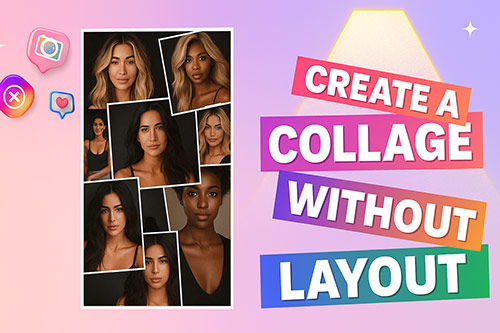
    Have you ever wanted to share multiple moments in one Story without being stuck in Instagram’s rigid Layout grids? A collage is the perfect solution. By combining several photos or screenshots into a single Instagram Story, you can tell a richer, more engaging story,especially when you understand how Instagram Stories work. And the best part? You don’t even need the Layout tool to do it. In this guide, we’ll walk you through beginner and friendly methods to create unique collages ,from Instagram’s hidden features to easy third-party apps.

    Why Create a Collage Without Layout?

    Instagram’s built-in Layout tool is useful, but it often feels restrictive. Not every story fits neatly into predefined grids, and sometimes you want more creative freedom to tell your story. Making a collage without Layout allows you to experiment with flexible positioning, combine text and stickers in unique ways, and craft a design that matches your personal style or brand identity. In other words, skipping the Layout tool opens the door to a more authentic and engaging storytelling experience.

    🪁 Flexibility : Position images freely, not bound by rigid grids.This flexibility makes collages especially useful for creative Instagram Story ideas that rely on storytelling rather than single images.

    🎨 Creativity : Combine text, stickers, GIFs, and photos in unique ways.

    🌟Personal Style : Build a story aesthetic that feels original.

     Create a Collage Without Layout

    How to Make a Collage Without Layout: Step-by-Step Methods

    Now that you know why creating a collage without Layout is a smart choice, let’s explore the practical ways to do it. Instagram offers more flexibility than most people realize. With a few hidden features and tricks, you can design a freeform collage directly inside the app , no external tools required. Below, we’ll cover the easiest methods, starting with Instagram’s Sticker Tool, which is perfect for beginners.

    Method 1: Create a Collage Using Instagram’s Sticker Feature

    Instagram has a hidden feature that allows you to add multiple photos as stickers. This is the simplest way to make a collage without Layout.

    1. Open Instagram and swipe right to enter Story mode.
    2. Choose a background (a solid color, gradient, or a photo).
    3. Tap the sticker icon (the smiley square).
    4. Select the Photo Sticker option.
    5. Pick an image from your camera roll. It will appear as a sticker.
    6. Resize, rotate, or move the image anywhere on your Story.
    7. Repeat the process to add more photos.
    8. Finish with text, GIFs, or effects before posting.

    ✅ Tips: Use different background colors to create contrast between layered images.

    to find and reuse engaging captions that match your Story.

    Method 2: Copy and Paste Photos (Manual Collage)

    If you want full control, you can manually copy and paste photos into your Story. This method works especially well on iPhones and some Android keyboards (like Gboard or SwiftKey).

    How it works:

    1. Go to your Photos/Gallery app.
    2. Copy the picture (on iOS, use the “Copy Photo” option; on Android, select “Copy to Clipboard”).
    3. Open Instagram Story editor.
    4. Tap and Paste the photo into your Story.
    5. Repeat as needed for multiple photos.

    This trick allows you to place images anywhere, creating a freeform collage.Go to your Photos/Gallery app.

    Method 3: Use Third-Party Apps for More Options

    If you prefer advanced design features, third-party apps can help you build stylish collages and then upload them to your Story.

    AppFree PlanPremium PlanBest For
    Canva✔️ Yes – basic templates, free stock photos, text toolsUnlocks premium templates, Brand Kit, background remover, team features, millions of stock assetsBeginners, businesses, content creators
    Unfold✔️ Yes – limited templates, fonts, and filtersHundreds of exclusive templates, advanced design packs, no watermark, scheduling toolsAesthetic storytelling & minimalist design
    Picsart✔️ Yes – editing basics, limited stickers/templatesMillions of premium assets, AI background remover, exclusive effects & fonts, unlimited storageCreative users who want freedom & effects
    Fotor✔️ Yes – simple collages and filtersPremium filters, HDR effects, cloud storage, exclusive templatesQuick, beginner-friendly editing
    Adobe Express✔️ Yes – core design tools, free stock imagesPremium templates, advanced editing, Adobe Stock access, brand managementProfessionals needing brand consistency

    Tips for a Professional-Looking Collage

    Even if you’re just starting out, a few simple design principles can make your Instagram collages look polished and eye-catching. These tips aren’t about advanced editing, they’re about small details that instantly elevate the final result.

    • Balance the Layout : Don’t overcrowd your Story. Leave some white space so each photo can stand out and the collage feels easy on the eyes.
    • Stick to a Color Scheme : Use consistent filters or background colors to create harmony between your images. A unified palette makes your collage look intentional rather than random.
    • Keep Text Clear and Readable : If you add captions, ensure the font contrasts well with the background. Avoid placing text on top of busy areas of your collage.
    • Simplify for Impact : Less is often more. A few carefully chosen photos with minimal decorations can be more striking than a cluttered collage full of stickers and effects.

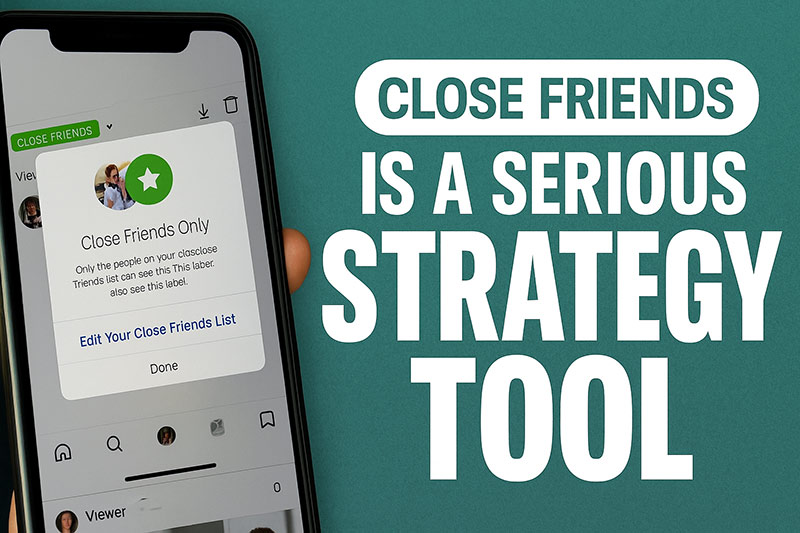
    Collages also work well as part of a Close Friends Story strategy, where content feels more personal and intentionally shared with a smaller audience.

    Mistakes That Can Ruin Your Collage

    When creating collages on Instagram Stories, many beginners fall into the trap of overloading their designs with too many photos or stickers, which makes the final result look cluttered. Another common issue is using low-resolution images that appear pixelated once uploaded, reducing the overall quality of the Story. Color harmony is also often overlooked; mixing unrelated filters or backgrounds can make the collage feel unprofessional. Finally, forgetting to preview the Story before posting can lead to awkward layouts or unreadable text. By paying attention to these details, you can avoid the most frequent mistakes and ensure your collages always look intentional and visually appealing.

    Conclusion

    Making a collage on Instagram Story without the Layout tool is easier than you might think. With the Sticker method, copy-paste trick, or third-party apps, you can design creative, unique Stories that truly stand out.

    👉 To take your Stories to the next level, try our instagram story download online
    . It allows you to quickly save and reuse engaging Stories, giving you more inspiration and freedom to create collages that look professional and unique.

    Frequently Asked Questions (FAQ)

    Can I make a collage on Instagram without using the Layout tool?

    Yes. You can use Instagram’s Sticker feature or the copy-paste method to freely place multiple photos in one Story.

    How many photos can I add to one Instagram Story collage?

    👉 Looking for the perfect text to pair with your collage? Try our Instagram Caption Downloader
    to find and reuse engaging captions that match your Story.

    Frequently Asked Questions (FAQ)

    Can I make a collage on Instagram without using the Layout tool?

    Yes. You can use Instagram’s Sticker feature or the copy-paste method to freely place multiple photos in one Story.

    How many photos can I add to one Instagram Story collage?

    There’s no strict limit, but adding too many images may make your collage cluttered. For best results, stick to 3–6 photos per Story.

    Does the Sticker method work on both iPhone and Android?

    Yes, but the exact steps may vary slightly depending on your device. On iPhone, the copy-paste method is also very popular.

    Do I need third-party apps to create a collage?

    Not necessarily. Instagram alone gives you enough tools to make collages, but third-party apps like Canva or Unfold offer more professional templates and features.

    Can I add text, stickers, or music to my collage?

    Absolutely. Once your collage is ready, you can decorate it with text, GIFs, emojis, or even music before posting it to your Story.

  • Best Travel Captions for Instagram Reels

    Best Travel Captions for Instagram Reels

    Travel is not just about ticking destinations off a list , it’s about creating stories, memories, and emotions you can relive forever. But when it comes to sharing your adventures on Instagram Reels, one thing matters as much as the visuals: the captions. The right travel caption can turn a simple video into an engaging story, spark wanderlust in your followers, and boost interaction.

    These ideas follow Instagram caption strategies for higher engagement, especially for short-form video content like Reels.

    That’s why we’ve created 50+ of the best travel captions for Instagram Reels. From short and funny to inspiring, adventurous, and even one-word gems, this list has everything you need.

    If you want to download instagram captions directly from Reels or posts you like, using a caption tool can save you time.

    Short Travel Captions for Instagram Reels

    Short captions are perfect when you want to make a quick impact and let the visuals speak.

    Examples:

    1. New city, same smile
    2. Trips end, memories don’t.
    3. Small bag, big dreams.
    4. Just landed, ready to go.
    5. Sunsets hit different here.
    6. Lost but happy.
    7. My kind of view.
    8. Wander, snap, repeat.
    9. Moments over miles.
    10. Sky above, road ahead.

    Traveling isn’t complete without sharing food moments, and if you want your travel reels to stand out, these creative food captions for Instagram can boost engagement and make your posts even more irresistible.

    Funny Travel Captions to Make Your Reels Pop

    Humor makes your content stand out and keeps it memorable.

    Examples:

    1. Lost the map, found the fun.
    2. Suitcase heavy, heart happy.
    3. Sunburn: my free tattoo.
    4. Work? Sorry, I’m abroad.
    5. My GPS says snack stop first.
    6. Catching flights keeps me fit.
    7. Running to the gate = cardio.
    8. Vacation mode: permanent.
    9. Jet lag is my second language.
    10. Camera eats first.

    Inspiring Travel Captions for Dreamy Reels

    Inspire wanderlust with captions that speak to the heart.

    Examples:

    1. Every trip rewrites your story.
    2. Small steps, big adventures.
    3. Travel is the best teacher.
    4. Go further, feel deeper.
    5. The world is bigger than fear.
    6. Collect smiles everywhere you go.
    7. Journeys change us.
    8. Leave with curiosity, return with stories.
    9. Travel opens doors no key can.
    10. Dream. Pack. Go.

    Adventure Travel Captions for Instagram Reels

    Inspire wanderlust with captions that speak to the heart.

    Examples:

    1. The view is worth the climb.
    2. Wild roads, calm mind.
    3. Lost but loving it.
    4. The climb is the gift.
    5. Every road hides a story.
    6. Adventure makes the best memories.
    7. Fear fades when you explore.
    8. Step out, level up.
    9. Keep moving, keep discovering.
    10. Adventure starts now.

    One-Word Travel Captions (With Emojis)

    Sometimes a single word says it all.

    Examples:

    1. Roam 🌍
    2. Escape ✈️
    3. Paradise 🏝️
    4. Explore 🧭
    5. Freedom 🕊️
    6. Journey 🚂
    7. Horizon 🌅
    8. Chill 🧘
    9. Vibes 🌊
    10. Adventure 🏔️

    Famous Travel Quotes for Reels

    Add timeless wisdom to your travel Reels with these powerful quotes.

    Examples:

    “The world is a book, and those who do not travel read only one page.” – Saint Augustine

    “Not all those who wander are lost.” – J.R.R. Tolkien

    “Take only memories, leave only footprints.” – Chief Seattle

    “Travel makes one modest. You see what a tiny place you occupy in the world.” – Gustave Flaubert

    “Life begins at the end of your comfort zone.” – Neale Donald Walsch

    “A journey is best measured in friends, not in miles.” – Tim Cahill

    “Once a year, go someplace you’ve never been before.” – Dalai Lama

    “The journey not the arrival matters.” – T.S. Eliot

    FAQs

    Why should I use captions for my travel reels?

    Captions add personality, tell a story, and encourage more engagement.

    What kind of travel captions perform best?

    Short, funny, and inspirational captions usually get higher interaction.

    Can I combine quotes with my own captions?

    Yes! Mixing classic quotes with personal lines makes your content authentic and unique.

    Do captions improve visibility on Instagram?

    Indirectly, yes. Captions with the right keywords and hashtags can boost discoverability.

  • Best Captions for Instagram for Boys Attitude

    Best Captions for Instagram for Boys Attitude

    On Instagram, the difference lies in your captions. For boys, a photo may catch the eye, but a powerful line beneath it captures attention, sparks reactions, and defines your vibe. A sharp caption can transform a simple selfie into a declaration of confidence, or turn a casual moment into a memorable post.

    Captions are more than words; they’re your digital attitude. They show the world if you’re cool, savage, stylish, or driven, and they make your personality shine beyond the picture. If you’re ready to stop blending in and start standing out, attitude captions are the weapon you need.

    These captions follow Instagram caption strategies for personal branding, where tone and consistency matter most.

    Why Attitude Captions Matter for Boys

    On Instagram, every post is more than just a photo, it’s a piece of your personal brand. For boys, attitude captions add the spark that turns an image into a statement. They show confidence, highlight individuality, and make your personality stand out in a crowded feed.

    First Impressions Count : People decide in seconds whether to engage with your post. A striking caption creates curiosity and sets the tone.

    Boosts Engagement : Strong captions encourage followers to like, comment, and share because they resonate emotionally.

    These styles often overlap with birthday captions for close friends, where emotion and confidence go hand in hand.

    Personal Branding : In a crowded feed, attitude captions help boys stand out, giving their profiles a unique voice.

    Storytelling Power : Captions can express what a photo alone cannot, your inner drive, ambition, or even your humor.

    In short, attitude captions are not just text under a photo; they’re a mirror of confidence and a tool for self-expression.

    Attitude Captions for boys

    25 Best Instagram Captions for Boys Attitude

    Here are fresh, creative, and versatile caption ideas to match different moods:

    Confident Vibes (6):

    • “Confidence is the best outfit, rock it daily.”
    • “I don’t need followers, I need vision.”
    • “Not arrogant, just aware of my worth.”
    • “Be the type of man your future self respects.”
    • “Confidence is my filter.”
    • “Confidence is my filter.”

    Cool & Stylish (6)

    • “Chill outside, fire inside.”
    • “Less effort, more impact.”
    • “My sneakers walk louder than words.”
    • “Cool is not what you wear, it’s how you carry yourself.”
    • “Sharp looks, sharper mindset.”
    • “Drip speaks louder than captions.”

    These cool tones also work well in travel captions for Instagram Reels, especially for lifestyle shots.

    Savage Energy (7)

    • “I’m the storm they warned you about.”
    • “Respect is expensive; not everyone can afford it.”
    • “I don’t chase, I attract.”
    • “Silent moves, loud results.”
    • “Born to disturb the comfort zone.”
    • “No crown needed, my vibe rules.”
    • “Legends don’t explain, they set examples.”

    Motivational Edge (6)

    • “Your vibe decides your tribe.”
    • “Chasing success, not validation.”
    • “Grind now, shine forever.”
    • “Hustle in silence, win with class.”
    • “Every setback is a setup for a comeback.”
    • “Focused on progress, not perfection.”
    best caption for instagram for boys

    Tips for Using Attitude Captions Effectively

    A good caption is powerful, but only if you use it the right way. Matching your words with your photo and vibe is what makes your post stand out.

    Match the Mood : Choose captions that reflect the energy of your photo.
    Example: For a gym selfie: “Strength is my style.”

    Keep It Short : One sharp line is more impactful than long text.
    Example: “Calm mind, savage soul.”

    Use Hashtags Smartly: Add relevant tags like #BoysAttitude or #InstaVibes.
    Example: “Born to stand out.” #BoysAttitude

    Stay Authentic : Pick captions that genuinely reflect your personality.
    Example: If you’re more chill : “Cool vibes only.”

    Mix It Up : Don’t repeat the same style; rotate between cool, savage, and motivational lines.
    Example: One day :,“Hustle in silence.” Next day → “Style over hype.”

    Helpful Tools for Your Instagram Game

    Finding captions is step one, but managing your Instagram growth needs tools too.

    Helpful Tools for Your Instagram Game

    FAQs

    How do I write the best attitude caption for boys?

    Keep it short, confident, and reflective of your personality.

    Can I use song lyrics as captions?

    Yes, but keep them relevant and not overused.

    Should I add emojis to captions?

    Emojis can boost engagement,but don’t overdo them.

    How often should I change caption styles?

    Mix between cool, savage, and motivational weekly to keep your profile fresh.

    Do captions affect Instagram growth?

    Yes! Captions with personality improve engagement rates and help you stand out.

  • How to Make an Instagram Reel with Photos and Music (2025 Guide)

    How to Make an Instagram Reel with Photos and Music (2025 Guide)

    Reels are Instagram’s favorite format, designed to boost engagement and reach. And here’s the secret: you don’t need video clips to create one. By combining your photos with music, you can build an eye-catching reel in just minutes. This guide walks you step by step through the process, with pro tips and best practices for making photo reels that stand out in 2025.

    Want to keep inspiration from other creators? Save any reel instantly with our Instagram Reels Downloader

    Quick Steps to Make a Photo Reel

    Creating a reel with photos and music is easier than it looks. To give you a quick overview, here’s the simple flow before we dive into details:

    1. Open Instagram → Tap + → Select Reel
    2. Pick one or multiple photos
    3. Adjust how long each photo appears
    4. Add music from Instagram’s library or your own audio
    5. Preview, add text and effects
    6. Choose a cover image and publish

    Creating a Reel from Photos Inside Instagram

    Instagram’s own app gives you everything you need to turn photos into reels. With just a few taps, you can arrange your images, adjust their timing, and add simple effects—all without leaving the platform.

    • Choose your photos: Select one or several images from your gallery.
    • Set duration: Decide how long each photo stays on screen.
    • Add text or stickers: Use overlays to highlight key moments or tell a story.
    • Apply transitions: Make the movement between photos smoother.
    • Use the align tool: Keep elements consistent when adding multiple frames.

    This method is perfect if you want to create a reel quickly without relying on third-party tools.

    make an instagram reel with phot

    How to Add Music to Your Instagram Photo Reel

    Music transforms a simple sequence of photos into a reel that feels alive and memorable. Instagram makes it easy to add sound directly within the app, so you don’t need any extra tools. Here’s how you can do it:

    • Browse the Music Library: Search for trending tracks or pick a song that fits your story.
    • Use Original Audio: Record your own sound or voiceover for a personal touch.
    • Trim and sync: Choose the exact part of the song that matches the rhythm of your photos.

    Want to save Stories together with their soundtrack? Try our Instagram Story Downloader

    Using Templates and Creative Tools for Instagram Reels

    If you want your photo reels to look more polished, templates and third-party tools can make the process faster and easier. Instead of adjusting everything manually, you can rely on pre-set timing, transitions, and even music.

    Instagram Templates: These are built into the app and already synced with audio. All you need to do is drop in your photos, and the reel is ready in seconds.

    Canva: Great for designing reels with custom fonts, colors, and branded elements.

    Kapwing: Ideal for adding animations, transitions, and advanced editing features.

    These tools save you time and give your reels a professional finish, especially if you’re creating content for business or want your posts to stand out visually.

    Best Practices to Make Your Reel Stand Out

    Publishing a reel is easy, but making people watch it to the end, and even share it, requires strategy. By following a few proven best practices, you can boost engagement and increase your chances of going viral.

    • Hook fast: Capture attention in the first 3 seconds with a strong visual or text overlay.
    • Use trending audio: Instagram’s algorithm often pushes reels that feature popular sounds.
    • Add captions: Many users watch with sound off, so captions keep your message clear.
    • Post consistently: Regular posting signals to Instagram that your content is valuable.
    • Experiment: Test different photo styles, transitions, and music genres to see what resonates with your audience.

    These simple habits make the difference between an average reel and one that builds real visibility.

    Pro Tips to Make Your Instagram Photo Reels Stand Out

    Creating a reel is just the start,the real challenge is making it engaging enough to stop the scroll. By applying a few smart strategies, you can transform simple photo reels into content that grabs attention and earns more views.

    Hook fast: The first three seconds should instantly spark curiosity.

    Use trending audio: Pair your photos with popular tracks for better reach.

    Add captions: Make your reel accessible to viewers watching without sound.

    Stay consistent: Posting regularly tells the algorithm your content is valuable.

    Experiment and analyze: Try different photo styles, music, and formats, then track what performs best.

    These tips help your reels rise above the noise and connect with your audience on a deeper level.

    Instagram Reel Requirements (2025)

    Even the most creative reel won’t perform well if it doesn’t meet Instagram’s technical requirements. By following these standards, you ensure your photo reels look sharp, load quickly, and are favored by the algorithm.

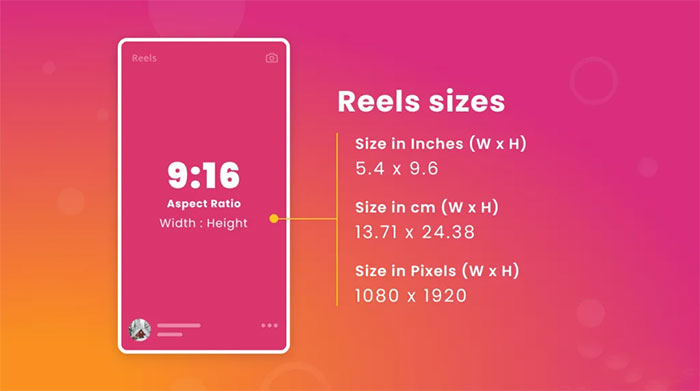
    • Aspect ratio: 9:16 for full-screen vertical display.
    • Resolution: At least 1080 x 1920 pixels for clear visuals.
    • Length: Up to 90 seconds for most users; some accounts can post reels up to 3 minutes.
    • Frame rate: 30 fps recommended for smooth playback.

    Sticking to these requirements helps your reels appear professional and optimized across all devices.

    instagram-aspect-ratio

    FAQs About Photo Reels with Music

    How many photos can I use in a reel?

    As many as you want, but 6–10 works best for attention span.

    Can I change the music after posting?

    No. Music must be set before you publish.

    Can I upload reels from a computer?

    Yes, via Meta Business Suite or third-party scheduling tools.

    Can I save captions and hashtags from Instagram reels?

    Use our Instagram Caption Saver to store and reuse captions from posts and reels.

  • Instagram Marketing Strategy in 2025: Algorithms, Best Posting Times & Growth Tactics

    Instagram Marketing Strategy in 2025: Algorithms, Best Posting Times & Growth Tactics

    By 2025, Instagram has evolved into a highly competitive ecosystem where success depends on strategy rather than random posting. As algorithms become more advanced and user expectations grow, creators and businesses must understand how content is ranked, when to post, and which formats drive real engagement.
    This guide explores Instagram’s algorithm updates, optimal posting times, and proven content strategies to help you grow sustainably in 2025.

    This article is designed for creators, marketers, and businesses who want to build long-term visibility and engagement on Instagram.

    How Instagram’s Algorithms Work in 2025

    Instagram no longer operates with a single universal algorithm. Instead, Feed, Stories, Explore, and Reels each have their own ranking system.

    • Feed & Stories: Prioritize posts from accounts you interact with most. Metrics like time spent viewing, comments, shares, and saves play a significant role.
    • Explore: Focuses on discovering new content. It favors trending posts, rapid engagement growth, and relevance to your browsing habits.
    • Reels: Designed for entertainment and reach. Completion rate, skip rate, and whether users engage with the audio are decisive factors.

    Understanding these metrics in isolation isn’t always enough.To see how completion rate, skip behavior, and engagement signals actually influence distribution, this guide on how the Instagram Reels algorithm works explains what happens behind the scenes and how creators can adapt.

    Key Algorithm Changes in 2025

    • Stronger emphasis on original content rather than repurposed media.
    • AI-driven content recognition that can analyze both text and visuals.
    • Higher weight given to meaningful interactions such as long comments or direct replies.
    • Cross-platform performance: posts performing well on Facebook may gain extra visibility on Instagram.
    Best Posting Times for 2025

    Best Posting Times for Instagram in 2025

    Studies analyzing millions of posts suggest global engagement peaks at 3 PM – 6 PM on weekdays. However, the optimal time varies depending on your audience’s location and habits.

    DayBest Times (Global Average)
    Monday3 PM – 5 PM
    Tuesday3 PM – 5 PM
    Wednesday2 PM – 5 PM
    Thursday2 PM – 4 PM
    Friday2 PM – 4 PM
    Saturday2 PM – 6 PM
    Sunday2 PM – 6 PM

    Pro Tip: Use Instagram Insights to check when your followers are most active and adjust accordingly.

    Content Strategy for Maximum Impact

    In 2025, success on Instagram depends on more than frequent posting. A strong content strategy focuses on originality, consistency, and genuine interaction. By aligning each post with clear goals and audience needs, creators can maximize both visibility and engagement.

    For creators focused on rapid reach and discovery, Reels play a central role.
    Many of the patterns that lead to explosive growth are explored in this practical guide on how to go viral on Instagram Reels in 2025.

    Know Your Audience

    Analyze demographics, behaviors, and preferences. Craft posts that align with their interests and challenges.

    Use Multiple Content Formats

    • Feed posts for brand consistency.
    • Stories for authentic, daily engagement.
    • Reels for creativity and viral reach.
    • Carousels for step-by-step guides or storytelling.

    Much of that reach comes from Explore visibility.
    There are specific actions that increase the likelihood of Reels being shown to new audiences, which we break down in 10 practical tips for getting Instagram Reels on the Explore page.

    Captions, Hashtags, and CTAs

    • Write storytelling captions with a clear call-to-action.
    • Use 3–5 targeted hashtags instead of spamming.

    Engagement Signals That Matter

    Reply to comments, host Q&A in Stories, and collaborate with influencers. A responsive presence strengthens trust.

    Using New Instagram Features

    • AI-powered translations in Reels expand your reach.
    • Retention and Skip Rate metrics help refine video quality.
    • Linked Reels enable storytelling across multiple clips.

    post strategy

    Execution quality strongly affects whether users stay or scroll.
    Fast, clean editing improves retention, which is why using the right tools matters. We reviewed some of the best apps for editing Instagram Reels quickly and cleanly to help streamline the process.

    Frequently Asked Questions (FAQs)

    How often should I post on Instagram in 2025?

    A balanced approach is 3–4 feed posts and 3–5 Reels per week, supported by daily Stories.

    Are hashtags still important?

    Yes, but their role is reduced. Focus on niche and relevant hashtags rather than trending ones.

    What kind of content performs best in 2025?

    Short-form videos (Reels), authentic behind-the-scenes content, and educational carousels show the strongest engagement.

    How can small businesses compete with big brands?

    By producing authentic content, engaging directly with followers, and leveraging cost-effective features like Stories polls and Reels challenges.

    Conclusion

    Instagram in 2025 rewards authenticity, creativity, and interaction. To stay competitive, creators and businesses must master posting times, adapt to evolving algorithms, and adopt innovative features. A strategic approach,built on audience insight, content diversity, and active engagement,will ensure sustainable growth and deeper connections with followers.